

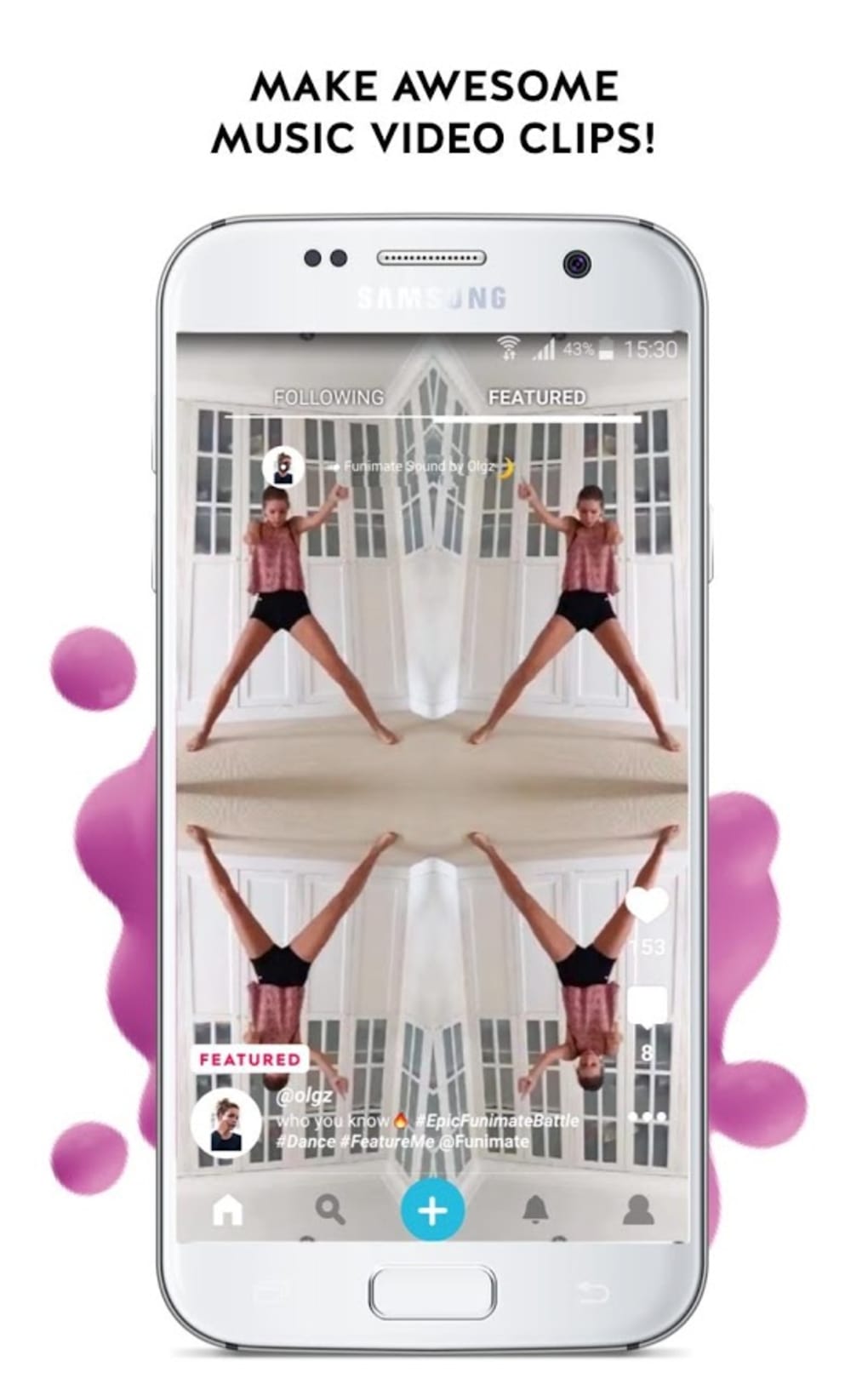


Download Funimate Video Editor Music Transitions Effects – video editor, music transitions, effects, fun video maker, social media video tool
Overview
Funimate is a desktop application designed to transform ordinary video clips into vibrant, entertaining content with a focus on creative effects, music integration, and real-time previews. The software targets casual users, social media content creators, and individuals seeking a playful way to enhance their video footage. While not intended as a professional-grade editing suite, Funimate emphasizes ease of use and immediate visual impact, making it ideal for users who want to quickly produce engaging videos for platforms like Instagram, TikTok, or YouTube Shorts.
The application allows users to import videos from their local gallery and apply a range of dynamic visual effects, transitions, and audio enhancements. These features are optimized for real-time playback, enabling instant feedback during editing—users can preview changes without waiting for lengthy rendering processes. This makes the workflow intuitive and enjoyable, particularly for those who value speed and fun over advanced control.
Funimate’s design philosophy centers on creativity and entertainment, encouraging users to experiment with exaggerated effects and playful transitions. The app supports the creation of music videos by syncing visual effects with audio tracks, enhancing the overall rhythm and mood of the content. Its community-driven aspect allows users to explore what others have created, share their own work, and engage in collaborative challenges, fostering a sense of connection among users.
The developer did not provide additional information about the company or its background. Platform compatibility and system requirements were partially provided, but exact specifications were not listed. Performance details were not specified, and no claims about security or resource usage were included.
Key Features & Capabilities
- Real-Time Visual Effects – Apply a variety of dynamic effects that render instantly, allowing users to preview changes without waiting for processing. This enables rapid experimentation and immediate feedback.
- Music-Driven Transitions – Sync visual transitions and animations with audio beats, ideal for creating rhythmic, music-centric videos that match the tempo of the soundtrack.
- 15+ Pre-Designed Video Effects – Includes a selection of playful, exaggerated, and visually striking effects that can transform mundane footage into entertaining content.
- Audio and Video Integration – Seamlessly combine video clips with music tracks, voiceovers, or sound effects to create rich multimedia experiences.
- Community Sharing & Inspiration – Access a built-in community where users can view, like, and learn from videos created by others using the same tools and effects.
- Instant Preview and Adjustment – Make quick edits and see results in real time, reducing the learning curve and increasing user engagement.
These features are particularly useful for social media creators who need fast turnaround times and visually compelling content. For example, a user recording a casual dance clip can apply a beat-synced transition and a glitch effect to make the video more dynamic. Similarly, a music enthusiast can turn a live performance into a high-energy video by layering effects that respond to the audio rhythm. The real-time nature of the editing process ensures that users can iterate quickly, testing different combinations until they achieve the desired result.
User Interface, Workflow & Performance
The user interface is designed for simplicity and visual appeal, prioritizing touch-friendly navigation and immediate access to core tools. Users can import videos from their local storage and begin editing with minimal setup. The layout appears to be streamlined, with effect categories, audio controls, and preview windows arranged for intuitive use.
Navigation is likely optimized for quick access to frequently used features, such as effect selection, audio syncing, and export options. The workflow emphasizes speed and ease, allowing users to apply effects, adjust timing, and preview results in a single flow. This is especially beneficial for users who are not familiar with complex editing software and prefer a more playful, exploratory approach.
Performance observations are based on general software behavior patterns. The application is designed to run effects in real time, suggesting efficient rendering processes. However, exact performance details were not specified. The developer did not provide information on CPU or RAM usage, nor did they disclose stability metrics or crash rates. Resource consumption is expected to vary depending on the complexity of applied effects and the resolution of the source video.
Stability and long-term reliability were not evaluated, as no user reports or benchmark data were provided. Users should expect a standard desktop application experience, with typical responsiveness and minimal lag under normal usage conditions.
Compatibility & System Requirements
Funimate is available for Windows and Mac operating systems, with support for both 32-bit and 64-bit architectures. The software version is listed as the latest release, and the installation file size is approximately 125 MB. This suggests a lightweight footprint, suitable for devices with moderate storage capacity.
Exact system requirements were not listed. The developer did not specify minimum processor speed, RAM, GPU capabilities, or disk space beyond the installation size. Compatibility information is limited to the operating systems mentioned. No details were provided about hardware acceleration, driver requirements, or support for external devices.
Users should ensure their system meets general desktop software standards to run the application smoothly. For optimal performance, a modern processor and sufficient RAM are recommended, though no official thresholds were defined.
Pros and Cons
Pros
- Real-time effect previewing for instant feedback
- Easy-to-use interface ideal for beginners and casual users
- 15+ creative, playful video effects with music synchronization
- Lightweight installation size (125 MB)
- Community feature for inspiration and sharing
- Fast workflow for quick social media content creation
Cons
- Not suitable for professional video editing workflows
- Limited customization options compared to advanced editing tools
- No detailed system requirements or performance data provided
- Exact resource usage (CPU/RAM) not disclosed
- Community features may require internet connection
FAQ Section
Is Funimate compatible with Windows and Mac?
Yes, Funimate is available for both Windows and Mac operating systems.
Can I use Funimate offline?
While basic editing functions may work offline, access to community features and some online effects may require an internet connection.
Is Funimate safe to download and install?
As a desktop application, Funimate is designed to be secure. However, users should download only from official sources to avoid potential risks.
Does Funimate offer free updates?
Updates are included with the software, but the frequency and availability were not specified.
What kind of license does Funimate use?
The license type was not disclosed in the provided information.
Final Thoughts + CTA
Funimate delivers a refreshing take on video editing by prioritizing fun, creativity, and speed over technical complexity. It excels in helping users quickly transform simple clips into lively, engaging content perfect for social media. While it lacks the depth of professional tools, its real-time effects, music synchronization, and community integration make it a standout choice for casual creators and content enthusiasts.
Its lightweight design and intuitive interface ensure accessibility for users of all skill levels. Whether you're enhancing a dance video, creating a music clip, or just experimenting with visual effects, Funimate offers a playful and rewarding experience.
For those seeking a simple, entertaining way to elevate their videos without the steep learning curve of advanced software, Funimate is a compelling option. Download Funimate now to start creating fun, dynamic videos with music transitions and effects.





.png)

